
By Steve Griswold, founder of Pixie Vacations · Updated November 16, 2026
Quick answer: If you want a vacation countdown that is completely free, with no ads, no sign-up and no paywall on widgets, use the Pixie Vacation Countdown. It runs in any phone browser today, and the iPhone and Android apps (with home-screen and lock-screen widgets) were submitted to the App Store and Google Play on November 16, 2026. If you only go to Disney World and don't mind a subscription, Countdown for Disney World is the most complete Disney-only app. For kid games and themes, the Vacation Countdown App by Kulana is free to download, with paid upgrades.
I'm a travel agent, and the question I hear right after "is it booked?" is "how many days now?" Families want a big number on the fridge, the phone and the lock screen. So in November 2026 I tried the countdown apps our clients were already using, and I kept running into the same thing: the countdown is free, but the widget, the reminders or the extra photos cost money.
That is why we built our own. Full disclosure: Pixie Vacations makes the Pixie Vacation Countdown, so weigh my pick with that in mind. I've kept the comparison to things you can check yourself on each app's listing.
On this page
What makes a good vacation countdown app?
After watching families use these apps, five things matter more than anything else:
- The widget is free. Most people want to see the number without opening an app. On several popular apps the home-screen widget is the paid part.
- Your own photo. A picture of the actual beach, ship or castle makes the number feel real.
- Dates that do something. A countdown is more useful when it also remembers final payment, online check-in and packing day.
- A kids mode. Young children don't understand "48 days." They understand "48 more sleeps."
- Easy sharing. Grandparents and the friends coming along should be able to follow the countdown without downloading anything.
The best vacation countdown apps, compared (November 2026)
| App | Best for | Widget | Kids mode | Trip checklist | What costs money |
|---|---|---|---|---|---|
| Pixie Vacation Countdown (web now; iPhone and Android in store review) | Families: beach, cruise and theme park trips | Home screen and lock screen, free (in the apps) | Yes: sleeps, a moon to tap for every night, daily stickers, a packing game | Yes, with dates; fills in Disney World booking dates for you | Nothing. No ads, no sign-up |
| Countdown for Disney World (Velocity Raptor) | Disney World, Universal and Disney Cruise fans | Yes, in the paid tier | Not that we found | Yes, a Disney to-do list dated from your trip | Subscription for widgets, most wallpapers and reminders |
| Vacation Countdown App (Kulana) | Any trip, kids who like games | Premium widget | Kids trivia and Airport Bingo | Not the focus | Premium version ($19.99 in the US App Store) and $1.99 themes |
| timeanddate.com countdown (website) | A quick number with no app | No | No | No | Free |
Checked November 15 and 16, 2026, from each app's App Store listing and our own test installs. Prices and features change, so check the listing before you pay.
Our pick for families: Pixie Vacation Countdown
We built it for the families we plan trips for, then made it free for everyone. You don't need to book with us to use it.
- Your trip, your photo. Name the trip, pick the date and choose a beach, ship or park photo (or your own). Count in days, weeks, sleeps or live down to the second.
- A little celebration every morning. The first time you open it each day, you tap a moon to cross off last night, and the number rolls down with confetti.
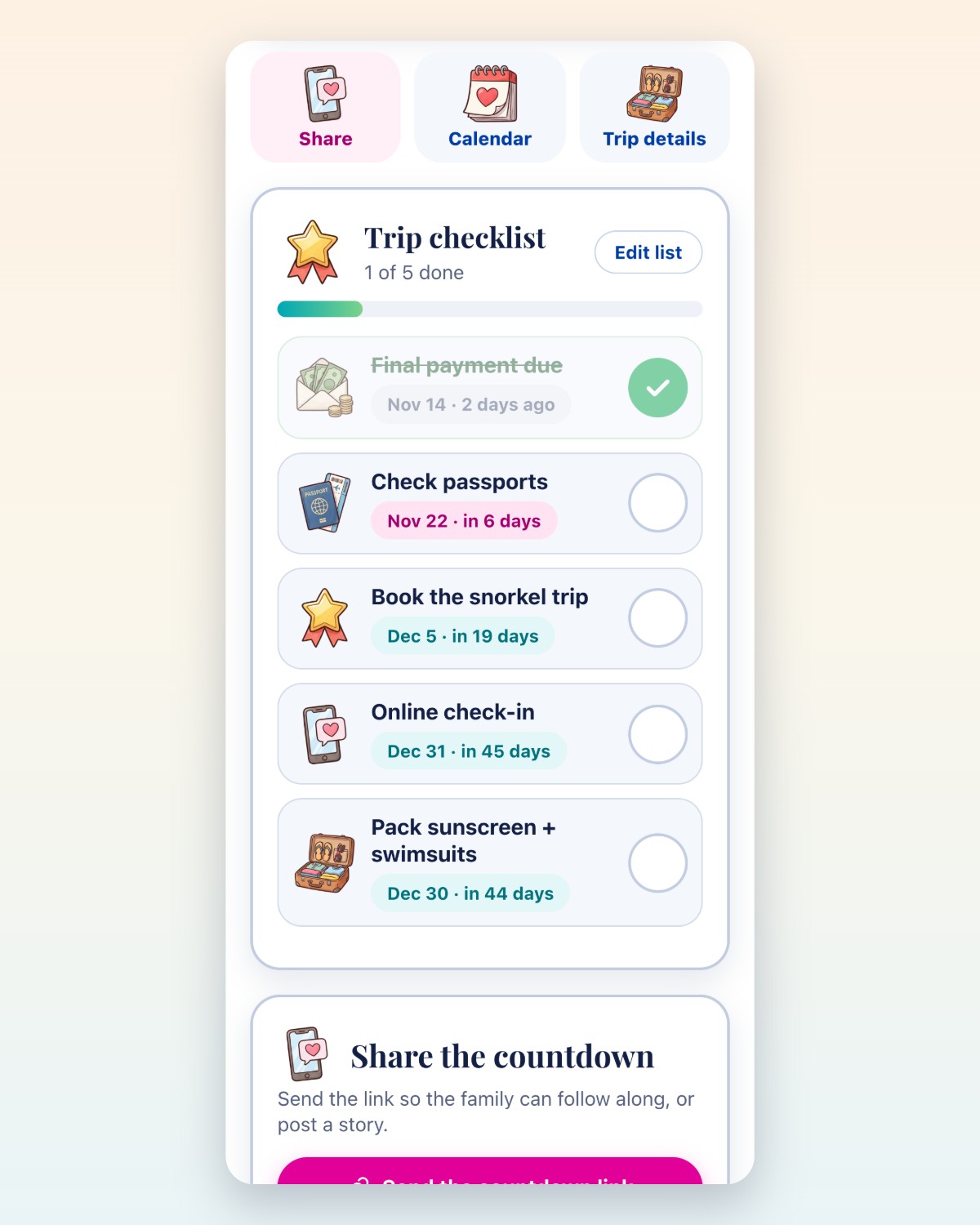
- A checklist that knows the dates. Final payment, online check-in, passports and packing, each with a date and a tick box. For Walt Disney World trips it fills in the real dining and Lightning Lane booking dates.
- Kids mode. Kids count sleeps instead of days, tap a moon for every night, collect a new travel sticker each day and help Dibs the hamster pack his suitcase.
- Share it. Send one link so the whole family can follow along, or save a story or square picture of your countdown.
- Calendar and reminders. On the web it adds your trip dates to your phone's calendar with alarms. In the apps it sends reminders and puts the countdown on your home screen and lock screen.
The honest downsides: it's new, so it doesn't have years of reviews yet, and until Apple and Google approve the apps the widgets aren't available. The web version works on any phone today, and your countdowns are saved on your phone with no account.
Best for Disney-only planners: Countdown for Disney World
This is the most popular Disney countdown app on the App Store, rated about 4.6 stars from roughly 8,800 ratings in November 2026. Its best feature is a to-do list dated from your trip, with Disney's dining and Lightning Lane booking windows. In our test, the subscription screen appeared right after setup, and the widgets, most wallpapers and reminders sit behind it.
Good for: families who go to Disney every year and want everything Disney in one app. Skip it if: you want a free widget, or your trip isn't Disney.
Planning Disney World? Our free Disney World countdown fills in the same booking dates at no cost, and our Disney dining reservation calculator gives you every deadline with calendar alarms.
Best for kid games and themes: Vacation Countdown App by Kulana
Kulana's app has been around for years and has a big following. Kids like the trivia and Airport Bingo, and there are lots of themes. It's free to download, and the App Store listing sells a Premium version for $19.99 plus $1.99 theme packs. The listing describes the live home-screen widget as a Premium feature.
Good for: keeping kids busy on travel day. Skip it if: you want trip planning dates in the same place as your countdown.
Other countdown apps worth a look
- Sailday: made for cruisers, with a duck mascot called Wade and travel groups that share packing progress.
- Zaffles: pretty story-card templates for sharing your countdown, and an animation when your bag is packed.
- Mouse Bound: a Disney countdown the whole family can share live, with reminders the day before dining and Lightning Lane windows open.
- ParksPal: theme park countdowns with milestone notifications and confetti on trip day.
- Countdown Widget & Photos: a general-purpose countdown with photo widgets and Live Activities.
How to put a countdown widget on your home screen
iPhone: install the countdown app and make your trip in it first. Then touch and hold an empty spot on your home screen, tap Edit, then Add Widget. Search for the app, pick a size and tap Add Widget. For the lock screen, touch and hold the lock screen, tap Customize, choose the lock screen and tap the widget area.
Android: make your trip in the app, then touch and hold an empty spot on your home screen, tap Widgets, find the app and drag the widget where you want it.
No app? On the web version, save the page to your home screen. In Safari, tap the Share button, then Add to Home Screen. It opens your saved countdown with one tap.
Questions people ask
Is there a free vacation countdown app with no ads?
Yes. The Pixie Vacation Countdown is free with no ads, no sign-up and no paid upgrades. It works in any phone browser at pixievacations.com/vacation-countdown/, and the iPhone and Android apps were submitted to the stores on November 16, 2026.
Which vacation countdown apps have a free widget?
Many popular countdown apps put the home-screen widget in a paid tier, including Countdown for Disney World and Kulana's Vacation Countdown App as of November 2026. The Pixie Vacation Countdown apps include home-screen and lock-screen widgets for free.
How do I count down to a vacation with young kids?
Count sleeps instead of days, and give kids something to do each night. In the Pixie countdown's Kids mode, children tap a moon for every sleep, open a new travel sticker each day and help Dibs the hamster pack. A paper chain with one link per night works too.
Is there a free Disney World countdown?
Yes. The Pixie Disney World countdown is free. Tell it whether you're staying at a Disney hotel and for how many nights, and it fills in your dining reservation date (60 days out at 6 AM Eastern), your Lightning Lane date and your final payment date.
Can the whole family follow one countdown?
Yes. Tap Share and send the link by text. Anyone who opens it sees the same countdown, photo and trip name, and can save it on their own phone.
Do I need to book with Pixie Vacations to use the countdown?
No. It's free for everyone. If you'd like help planning the trip itself, a Pixie Vacations agent can plan it with you at no additional cost.
Counting down to a trip that isn't booked yet?
Tell us where you want to go and when. A Pixie Vacations agent who has been there will plan it with you, keep track of every payment and booking date, and get to know what your family wants from the trip. There is no additional cost, and more than 1,000 verified client reviews average 5.0 stars.

About the author. Steve Griswold founded Pixie Vacations in Canton, Georgia, a family travel agency that plans Disney, cruise and Caribbean vacations. He built the free Pixie Vacation Countdown so families would have one happy place for their trip dates. He has been quoted in TravelPulse, Parade and Southern Living. Read our client reviews.
Sources: App Store listings for Countdown for Disney World (Velocity Raptor) and Vacation Countdown App (Kulana Media Productions), and our own test installs, checked November 15 and 16, 2026. Store prices vary by country and change over time.
Have a fantastic vacation.